Google Website Translator Gadget

Tampilkan postingan dengan label Internet. Tampilkan semua postingan

Veronisoft IP Monitor v.1.3.30.1 + Serial

Wawan Gunawan | Senin, Agustus 08, 2011 |

Sobat bloger yang mencari tools kecil untuk mengetahui kecepatan internet agan melalui ping dari system kita, kini App. Store menghadirkan aplikasinya, walaupun kecil tapi sangat bermanfaat.






IP Monitor is a network monitoring software that allows you to verify the network connectivity of IP hosts on the Internet and LAN. The program periodically pings, or checks TCP ports on user specified computers (workstations, servers) or other network devices (routers). It is able to monitor IP and show graphic notifications when the states of some computers change. You can also view and access shared folders, open web and ftp, ping, trace rout and sending messages. IP Monitor can generate status log files.
* Now Full Support for IPv6 addressing.
* New Evaluation Period Please try IP Monitor again.
* IP Monitor Lite version now available


Internet Download Manager 6.07 Build 7 + Patch Keygen Full Versi

Wawan Gunawan | Selasa, Agustus 02, 2011 | ,

WOW!Sobat bloger yang menggunakan IDM sebagai download manegernya, kini ada updatean terbarunya yang kini telah mencapai versi 6.07 Build 7 .


Internet Download Manager News

What's new in version 6.07 build 7?
(Released: Aug 01, 2011)
  • Enhanced "Speed Limiter". Added the feature to set an individual limit for every download
  • Redesigned "Download progress" dialog, added new tabs and the possibility to disable tabs that are not necessary for you
  • Fixed bugs 


    Download IDM 6.07 Build 7 Full Versi


Modem Booster v5.0 Build 111 Preactived Full Versi

Wawan Gunawan | Jumat, Juli 15, 2011 |

Sobat Bloger pusing dengan modem sobat yang koneksinya lemot??? Hehehehe... sama kaya' ane.. tapi kini semua berubah dengan aplikasi yang saya share ini. Selain menggunakan wifi saya juga menggunakan modem cdma yang dari dulu kecepatannya tidak pernah berubah (lemot). Tetapi sejak menggunakan aplikasi ini kecepatanna berubah.... internetan di modem kek pake wifi aja.. hehehhe.. ajaib bin ajaib...

Fitures :

Boost your Internet Speed!
Slow connection hindering your enjoyment of the Internet? Enhance your internet connection and Boosts your Internet speed up to 300% with Modem Booster’s proprietary PING technology!

Works on All Internet Connections!
Modem Booster now works on all Internet connections, even high speed internet access connections! Dial-up, DSL, ADSL, Cable modem speeds can all be improved with this Internet accelerator!

Max Out your Modem Speed!
Modem Booster tests your Internet speed settings systematically by running a series of diagnostic tests to see how much room there is for improvement, then determines the best settings for improved performance!

Tweak Hidden Internet Settings!
This accelerator download tweaks and optimizes your hidden Windows settings safely for greater Internet speeds!


Download Modem Booster v5.0 Preactived Full Versi


Screnshoot :


Internet Download Manager v6.07 Build 2 + Patch Serial Full Versi

Wawan Gunawan | Minggu, Juli 10, 2011 | ,

WOW!Kemarin Internet download manager kembali mengeluarkan produk terbarunya versi kedua, yakni Internet Download Manager 6.07 Build 2 yang dimana saya rasa Idm pada kali ini memperbaiki bugs pada google chrome dan mozilla firefox khususnya mozilla firefox 5. Jadi agan-agan sekalian yang IDMnya sudah teriak-teriak minta update terbarunya.. nih gua kasih dah,..


Internet Download Manager Feature

 All popular browsers and applications are supported!

 Download Speed Acceleration.
Internet Download Manager supports all popular browsers including IE, AOL, MSN, Mozilla, Netscape, Firefox, Avant Browser, and many others. Internet Download Manager supports all versions of all popular browsers, and it can be integrated into any Internet application to take over downloads using unique "Advanced Browser Integration" feature.
 

Internet Download Manager can accelerate downloads by up to 5 times due to its intelligent dynamic file segmentation technology. Unlike other download managers and accelerators Internet Download Manager segments downloaded files dynamically during download process and reuses available connections without additional connect and login stages to achieve best acceleration performance.
 Easy downloading with one click.

 Download Resume.
When you click on a download link in a browser, IDM will take over the download and accelerate it. You don't need to do anything special, just browse the Internet as you usually do. IDM will catch your downloads and accelerate them. IDM supports HTTP, FTP, HTTPS and MMS protocols.

Internet Download Manager will resume unfinished download from the place where they left off. Comprehensive error recovery and resume capability will restart broken or interrupted downloads due to lost or dropped connections, network problems, computer shutdowns, or unexpected power outages.
 YouTube grabber.

 Simple installation wizard.
Internet Download Manager can record and download FLV videos from popular sites like YouTube, MySpaceTV, and Google Video. The best way of downloading webpage embedded videos from the Internet is here. After installing IDM, "Download This Video" button pops up whenever you are watching a video anywhere in the Internet. Just click on the button to start downloading clips.

Quick and easy installation program will make necessary settings for you, and check your connection at the end to ensure trouble free installation of Internet Download Manager
 Automatic Antivirus checking.

 Built-in Scheduler.
Antivirus checking makes your downloads free from viruses and trojans. IDM can automatically run a scanner on download completion, like AdAware, Avast, Spybot, AVG Anti-Virus, McAfee, SpywareBlaster, CCleaner and others to protect users from harmful downloaded files.

Internet Download Manager can connect to the Internet at a set time, download the files you want, disconnect, or shut down your computer when it's done. You can also synchronize changes using periodic synchronization of files. It's possible to create and schedule several download queues for downloading or synchronization.
 Drag and Drop.

 Advanced Browser Integration.
You may simply drag and drop links to IDM, and drag and drop downloaded files out of Internet Download Manager.

When enabled, the feature can be used to catch any download from any application. None of download managers have this feature.
 IDM includes web site spider and grabber.

 Customizable Interface.
IDM downloads all required files that are specified with filters from web sites, for example all pictures from a web site, or subsets of web sites, or complete web sites for offline browsing. It's possible to schedule multiple grabber projects to run them once at a specified time, stop them at a specified time, or run periodically to synchronize changes.

You may choose the order, buttons, and columns to appear on the main IDM window. There are several different skins for the toolbar with different button styles. All skins can be downloaded from IDM home site. Also users can design their own skins.
 IDM supports many types of proxy servers.

 IDM supports main authentication protocols: Basic, Negotiate, NTLM, and Keberos.
For example, IDM works with Microsoft ISA, and FTP proxy servers.

Thus IDM can access many Internet and proxy servers using login name and password.
 Download All feature.

 Download limits.
IDM can add all downloads linked to the current page. It's easy to download multiple files with this feature.

Progressive downloading with quotas feature limits downloading to defined number of megabytes per hour. The feature is useful for connections that use fair access policy (or FAP) like Direcway, Direct PC, Hughes, etc.
 IDM is multilingual.

 Quick Update Feature.
IDM is translated to Albanian, Arabic, Azerbaijan, Bosnian, Bulgarian, Chinese, Croatian, Czech, Danish, Dutch, Farsi, French, German, Greek, Hebrew, Hungarian, Italian, Japanese, Korean, Lithuanian, Macedonian, Norwegian, Polish, Portuguese, Romanian, Russian, Serb

ian, Slovak, Slovenian, Spanish, Thai, Turkish, and Uzbek languages.

Quick update may check for new versions of IDM and update IDM once per week. Quick updates feature lists all new features added to the latest version and asks a user if he wants to update IDM to the latest version.
 Download Categories.

Dynamic Segmentation.
Internet Download Manager can be used to organize downloads automatically using defined download categories.


BLUE HTV SOFTWARE STREAMING ONLINE 2.8 (Aplikasi Nonton Tv Online)

Wawan Gunawan | Sabtu, Juli 09, 2011 | ,

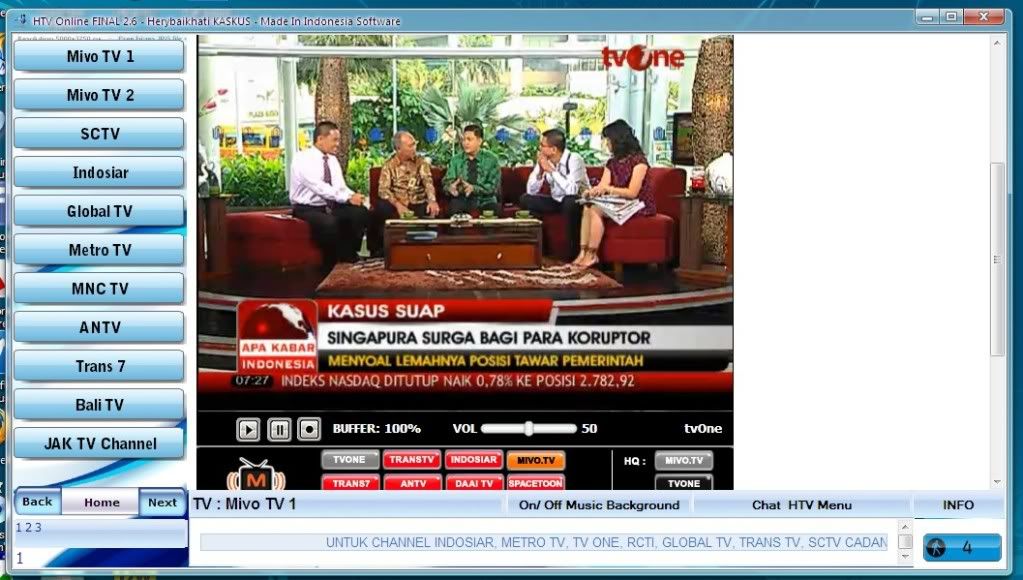
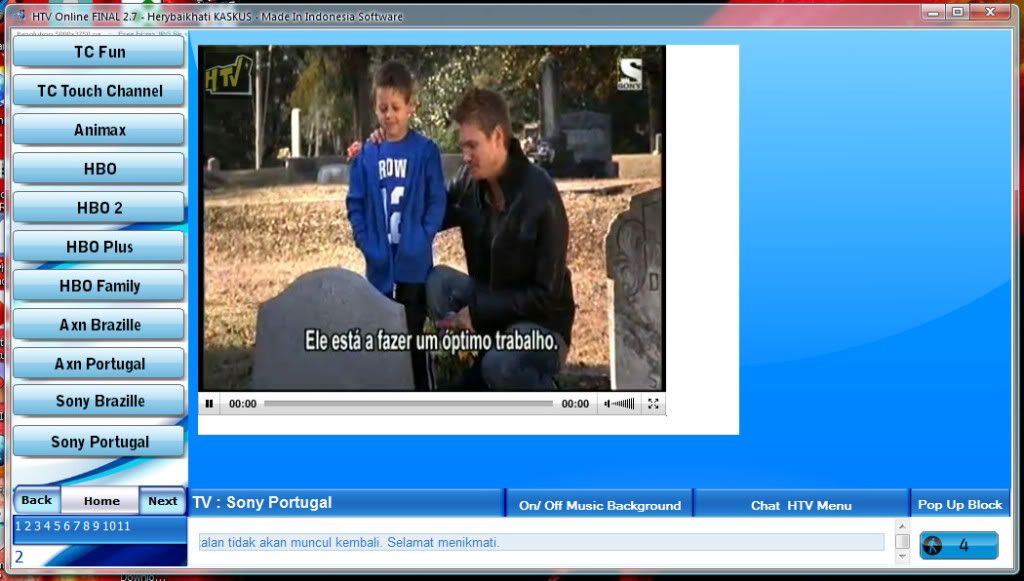
Buat sobat bloger yang lagi nganggur, ndak ada kerjaan, yuks kita nonton tv. Tapi disini tv yang di maksud adalah nonton tv streaming secara online yang dimana kamu bisa mengakses semua chanel dunia dengan satu macam aplikasi. Yah... Aplikasi itu adalah HTV versi 2.8, yang dimana dalam pembuatannya di buat oleh asli orang Indonesia sendiri ( Bangga Kale..) Mau liat fitur yang dimiliki HTV ini...?? Cekidot...


Menu special yang tersedia di HTV :

1. TV Online Mancanegara
2. TV Online Indonesia
3. Radio Online Mancanegara
4. Radio Online Indonesia
5. CCTV Mancanegara
6. CCTV Indonesia
7. Cinema 24 HTV
8. TVU & Sofpcast Channel
9. Relax Game
10. Chat HTV
Keuntungan menggunakan aplikasi multifungsi ini :

1. Full Hiburan siaran bermutu Lokal dan Mancanegara.
2. Bisa mengetahui posisi jalan-jalan di Jakarta atau di Luar kota yang lancar atau yang sedang macet.
3. Pengguna Busway/ TransJakarta bisa melihat keadaan Halte lagi ramai atau tidak.
4. Punya usaha rumah makan, minimarket, warnet? pastinya butuh hiburan music biar pengunjung tidak bosen, pakai saja HTV, silahkan pilih bnyk channel-chanel radio dan tv 24 jam yg siap menemani anda, baik dalam negeri atupun luar negeri. Serasa pengunjung anda semakin dimanjakan.
5. Anda punya anak, ponakan, sepupu? HTV tersedia channel-channel khusus anak anda.
6. Bisa buat teman santai sambil kerja, apalagi sambil internetan.
7. Buffer diminimalisir gan, lebih maknyos nontonnya.
8. Suka ngegame gan iseng2? silahkan dicoba menu baru HTV nya.., lumayan buat ngilangin bosen sewaktu istirahat.
9. Hobi nonton bioskop gan? wah cocok banget nih di HTV bnyk siaran2 cinema yang bisa jadi referensi buat nonton ala bioskop rumahan/ kantoran.
10. Paling utama keuntungannya tanpa instalasi gan, bisa ditaro di Flashdisk agan, jd dimana saja dan kpn saja kalo lagi mampir2 bisa langsung mendapatkan hiburan.


Screenshoot :


Percepat Internet Agan dengan Throttle 6.7.4.11 Full Patch Keygen

Wawan Gunawan | Kamis, Juli 07, 2011 |

Bagi sobat bloger yang merasa koneksi internetnya tidak stabil, tidak ada salahnya agan sekalian mencoba aplikasi saya ini.  Untuk keterangan lebih lanjut mengenai prodak ,keunggulan dan fitur, nih gan gua kasih....

Throttle can increase your internet connection dramatically and allows you to surf websites and download files much faster. If you are on a Dial-Up connection you may suffer from constant dropped connections, with Throttle this problem can quickly be fixed. Not only does Throttle work with Dial-Up connections but it also works with Cable and DSL connections and can reduce the time it takes to download large music, movies and games from your favorite websites. Increase the speed of your internet connection and improve the stability of your connection by avoiding disconnects and bandwidth congestion.


Throttle works by making permanent modifications to the Windows system registry and system files, these changes affect how your modem interacts with your internet service provider, download faster, play faster and surf the web faster by using Throttle. All settings made by Throttle can be fully reversed, allowing you to fully test the software and make sure it works properly with your computer and modem. The settings made by Throttle work even after you reboot your computer, so you do not have to worry about running Throttle each time you reboot Windows.


Don't pay extra money per month to your internet service provider to get a faster internet connection, download Throttle and increase your internet speed yourself. Why suffer with a slow internet connection and constant disconnects when there is a solution available to improve your internet experience today.

 Features and Benefits of Throttle

  Makes direct changes to the Windows system registry and system files to increase internet download and upload speeds.
  Automatically adjusts internet settings and changes made based on the computer and modem specified by the end-user.
  Works with all modem types - Dial-Up, DSL, ADSL, Cable, ISDN, Satellite, and Mobile Phone internet connections.
  Compatible with the latest versions of Microsoft Windows, including Windows Vista 64-BIT and 32-BIT computers.
  Increases both internet transfer speeds as well as local area network speeds, increase the speed of local area network PC-PC file transfers by using Throttle.
  New and improved modern user interface, easy and intuitive to use and compliant with Windows user interface guidelines.
  Software was entirely developed and built in the United States. Technical support also is based in the United States.
  Try before you buy licensing with dedicated software updates and quality around the clock technical support.

Minimum System Requirements for Throttle :
  1. Microsoft ® Windows 7, XP, Vista, 2000, 2003, 2008
  2. 90 megahertz (MHz) processor or faster
  3. At least 8 megabytes (MB) of RAM
  4. At least 5 megabytes (MB) of available space on the hard disk
  5. Keyboard and a mouse or some other compatible pointing device
  6. Video adapter and monitor with Super VGA (800 x 600) or higher resolution
  7. Fully compatible with 32-BIT and 64-BIT computers


    Download Throttle 6 Full Patch Keygen

    Download Only Patch Keygen Throttle 6

Berselancar Internetan Lancar dengan SiteAdivisior for Mozilla Firefox

Wawan Gunawan | Selasa, Juli 05, 2011 |

  Buat sobat blogger yang sering amat online di internet, ada ini gan tools bagus dari McAfee..... Yakni SiteAdvisior Plus, Disediakan khusus bagi agan-agan sekalian yang ingin memilih lancar internetan didunia maya.
McAfee SiteAdvisor Plus adalah software keamanan berinternet yang sangat ampuh melindungi anda saat browsing. Dengan kemampuan perlindungan yang realtime, McAfee SiteAdvisor Plus akan melindungi anda dari situs – situs berbahaya, situs phising, link – link berbahaya yang tersebar di email, instant messaging dan lain – lain.
Fitur McAfee SiteAdvisor Plus sendiri adalah sebagai berikut :
1. Safe Search : melindungi anda saat browsing di search engine seperti google, yahoo, msn, AOL dan ASK. Rating SiteAdvisor akan muncul di hasil pencarian.
2. Safe Browse : Saat browsing, akan ada tombol kecil di toolbar browser anda yang akan memberikan indikasi warna tingkat keamanan website yang anda buka.
3. Advance Phising protection : akan melindungi anda dari situs – situs berbahaya yang hobinya mencuri identitas dan data-data pribadi anda.
4. Link Checking : akan melindungi anda dari link – link berbahaya yang sering disebarkan spammer melalui email dan instant messaging.
5. Know in Advance : akan memberikan anda peringatan jika ada website berbahaya yang anda kunjungi.
6. Protected Mode : Melindungi anda dan password anda dari situs – situs yang berbahaya
7. Get the Details : anda bisa memperoleh dan melihat detail situs – situs berbahaya hanya dengan sekali klik.
8. Always Upgrading : akan ada update gratis secara otomatis jika tersedia versi baru dari McAfee SiteAdvisor Plus.
Software yang bermanfaat ini memiliki harga $19.99 , namun anda bisa memperolehnya secara GRATIS dan LEGAL dalam waktu yang terbatas..bagaimana caranya?? berikut ini PG bagi tips mendownload McAfee SiteAdvisor Plus Full Version secara GRATIS dan LEGAL happy
1. Klik Disini Untuk mendownload siteadvisior (terlebih dahulu register yah...)
2. Klik tombol DOWNLOAD NOW

Download McAfee SiteAdvisor Plus

Download McAfee SiteAdvisor Plus
3. Klik tombol Login Now jika anda memiliki akun McAfee atau cukup Klik Register untuk mendaftar baru.
4. Setelah login, di halaman My Account, silahkan klik tombol Online Installation.
5. Klik tombol Download untuk mendownload DMSetup.exe


INGAT! : Trik ini tidak berlaku untuk selamanya..siapa cepat dia dapat..jadi silahkan download sebelum kehabisan happy

Google Earth Plus 6.0.2 + Patch Full Versi

Wawan Gunawan | Jumat, Juli 01, 2011 |

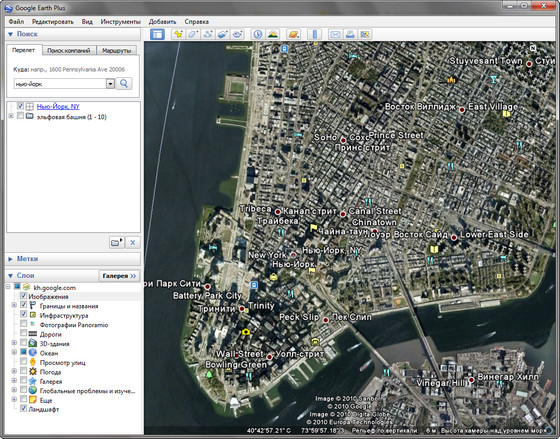
Agan sekalian pasti agan semua tau aplikasi apa ini. Yah... ini adalah google earth.. kalau agan mau liat rumah agan ini gua kasi aplikasinya versi plus dengan vitur terlengkap dan terbaru...
Google Earth merupakan sebuah program globe virtual yang sebenarnya disebut Earth Viewer dan dibuat oleh Keyhole, Inc.. Program ini memetakan bumi dari superimposisi gambar yang dikumpulkan dari pemetaan satelit, fotografi udara dan globe GIS 3D. Tersedia dalam tiga lisensi berbeda: Google Earth, sebuah versi gratis dengan kemampuan terbatas; Google Earth Plus ($20), yang memiliki fitur tambahan; dan Google Earth Pro ($400 per tahun), yang digunakan untuk penggunaan komersial.


APP. STORE Copyright © 2010 App. Store is Designed by Wawan Home | RSS Feed | Comment RSS