Google Website Translator Gadget

Tampilkan postingan dengan label Desain Grafis. Tampilkan semua postingan

WebcamMax 7.5.2.6 + Patch Keygen Full Versi

Wawan Gunawan | Jumat, Agustus 12, 2011 |

Bagi sobat bloger yang hoby foto-foto, pasti agan semua sudah tau ini aplikasinya.... Yah ini adalah WebcamMax dengan fitur terbarunya yakni  mendukung webcam dengan clip art nya yang lucu-lucu dan juga support dengan aplikasi-aplikasi chat seperti Windows Live Messenger, Skype, Yahoo Messenger, ICQ, Paltalk, Camfrog, YouTube, Ustream, JustinTV, dan banyak lagi. Jadi tunggu apa lagi gan.. ayo kita Beralay-alayan + lebay-lebayan hanya di WebcamMax..... ayo silahkan dowload gan... Semoga bermanfaat.

Add Effects :: Add Accessories Effects

FITURES :

  1. Thousands of Fantastic Effects
    Thousands of cool effects for your live video chats and video recording. You can download limitless effects at webcammax.com.
  2. Video Recording
    Record your fantastic videos show with our cool effects to broadcast on YouTube or Facebook.
  3. Virtual Webcam
    Share your video clips or desktop screen with family and friends through your Instant Messengers even without a real webcam.
  4. Easy to Share
    Directly share your cool videos and photos with family or friends on Facebook. You can also upload and share your videos on Youtube.
  5. Doodling and PinP
    Paint on the video box freely and directly. You can also broadcast different sources at the same time with Picture in Picture feature.
  6. Work for All
    Work for almost all webcam programs such as Windows Live Messenger, Skype, Yahoo Messenger, ICQ, Paltalk, Camfrog, YouTube, Ustream, JustinTV, and much more.


 Screenshoot  :

Add Effects :: Add Emotions Effects


Doodling :: Add Stamp On Webcam

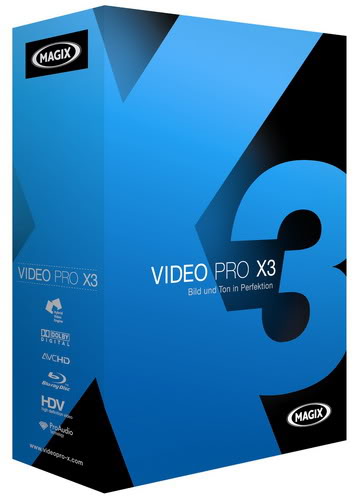
MAGIX Video Pro X3 + Crack Full Version

Wawan Gunawan | Rabu, Juli 27, 2011 |

Pada kesempatan ini saya akan mengshare aplikasi bagoes, aplikasi khusus editing video.
Bagi sobat bloger yang memerulkan editing video yang bagus, tak ada salahnya sobat bloger menggunakan aplikasi ini, apalagi bagi sobat bloger yang berkerja di bidang Broadcasting.... Hmmm.. Mankysos dah...

Features :
Professional video editing
NEW! Efficient 3- and 4-point cut

Thanks to the 3-point cut function in MAGIX Video Pro X3, it's much easier to insert video clips into the timeline.


Users simply specify where in the arrangment the clip should be inserted and determine a start marker for the file they want to import. The computer then automatically calculates the cut points and fills in the gaps in the timeline precisely.

Innovative 4-point cut is one of the new features in MAGIX Video Pro X3. By assigning in and out points in the source monitor and the timeline, clips can be inserted into sections automatically via timestretching.


System requirements

For Microsoft® Windows® XP | Vista® | 7

For 32- and 64bit
Minimum system requirements
  • Intel® Core™ Duo 1,83 GHz, AMD® Dual-Core 2,0 GHz, or higher
  • 1 GB RAM
  • 1 GB hard disk memory and a DVD drive for program installation
  • Graphics card with a screen resolution of at least 1024 x 768
  • Sound card (multi-channel sound card recommended for surround sound editing)

Recommended minimum configuration for AVCHD editing

  • Intel® Core™ 2 quad processor with 2.83 GHz (Intel® Core™ i7 recommended)
  • 4 GB RAM
  • DirectX 9.0c compatible graphics card, NVIDIA GeForce 6600, ATI Radeon X300 or higher with 512 MB VRAM and Pixelshader 2.0
  • Blu-ray™ Disc burner to create Blu-ray™ Discs

System requirements for 3D playback

  • Red/cyan glasses required for anaglyph 3D display (included).
  • A special monitor is needed for viewing using polarized filter glasses.
  • A 120 Hz monitor or a projector as well as compatible shutter glasses and graphics card are required for shutter playback.

Download Instaler MAGIX Video Pro X3

Download Crack MAGIX Video Pro X3 

Comic Life 1.3.6 Deluxe Edition + Patch Full Version

Wawan Gunawan | Senin, Juli 25, 2011 |

Pada kesempatan kali ini saya akan share aplikasi yang bagus khusus buat sobat bloger yang kreatif membuat gambar animasi dalam bentuk komik. Selain ringan aplikasi ini juga mudah untuk di gunakan jadi tidak ribet seperti aplikasi animator lainnya seperti anime studio, dll.. Untuk keterangan megenai fitur-fitur nih saya kasih gan :

Fitures :

Be the Hero You Are!

Comic Life lets you create astounding comics, beautiful picture albums, how-tos... and more!

The easy-to-use interface integrates seamlessly with your photo collection. Drag in your pictures, captions, Lettering text (‘ka-blam!') and speech balloons and your work is done!

You can even use your webcam within Comic Life to make a comic on the spot!


Funny Kids and Hound doggie

Fast... ZZooooommmm

Comic Life gives you fun and professional templates for instant, impressive, photo layouts. Tweak your creations to your hearts desire!


Why Comic Life?

  • So easy, you and your dog can do it
  • Image Filtering options for your photos
  • Easily drag-and-drop images from the integrated Photo viewer or desktop
  • Library of pre-made templates, styles
    and fonts
  • Webcam / DV Cam image capture
  • Bendable, authentic comic lettering text


Super-Shine

Looking for something special? Enhance the look of your photos with the many included filters like hand-drawn, painted and night vision.


Share your Life Stories

Comic Life makes it easy to share your creations with friends and family. Comic Life supports exports to HTML, JPEG, TIFF and PNG, so you can share on your website, blog or via email.


Print out pristine, lasting copies via your printer or professional printers. Stand back and watch people smile, laugh and be captivated by your creations!

Keepin' it Real

Print your creations to share with Grandma (when her 'net is down). Laughter ensues.

Tried and Tested

Get your hands on the award-winning Comic Life, as used and loved by millions of kids, grownups, schools and police forces around the world.


Download Comic Life 1.3.6 Deluxe Edition + Patch Full Version

RonyaSoft Poster Disgner 2.01.24 + Crack Full Versi

Wawan Gunawan | Minggu, Juli 17, 2011 | ,

Buat sobat bloger yang mencari software untuk membuat poster, iklan, spanduk, umbul-umbul atau sejenis lainnya ; ini gan ada softwarenya dengan produl terbarunya yang bernama Poster Disgner buatan RonyaSoft. Mau liat fitur-fitur yang dimilikinya.. nih gua kasih gan... :


Fitures :
  • WYSIWYG (What You See Is What You Get) object editor
  • Object rotation and transparency support
  • Poster projects support
  • Print Master with layout customizing
  • Export to images
  • Multipage printing
  • Built-in ready-to-use predesigned poster templates
  • Built-in clipart library
  • Multilingual interface with Unicode support
  • Amazing skins
  • Metric and Imperial measurements (mm, cm, inch)

Environment

Windows 2000, Windows XP (32 & 64), Windows Vista (32 & 64), Windows 7 (32 & 64).
Requirements
Pentium III 1500, 256 Mb RAM, 50 Mb hard space, regular printer or plotter (US Letter; DIN A4, A3, A2, A1 or A0 paper format).


Download Now RonyaSoft Poster Disgner 2.01.14 Full Versi

Screenshoot :


CorelDRAW X5 Versi Portable

Wawan Gunawan | Sabtu, Juli 16, 2011 |

App. Store
Okey buat sobat bloger pasti udah tau ini aplikasi buat apa??? Ya.. kalo udah tau jawabannya kini saya hanya bisa membantu mengshare apa yang saya punya untuk agan sekalian..... Hehehehe, sekalian menjawab request sobat bloger yang udah lama menunggu aplikasi ini. Pada kesempatan ini CorelDRAW X5 yang saya share ini dalam bentuk portable cuma 200mb-an... Jadi tunggu apalagi yuks langsung ke TKP... hehehe..
Gua udah coba dan berhasil di Windows 7 all..... _Tested By Me... -__-"


Download CorelDRAW X5 Portable Version


System Requirements

  • Microsoft® Windows® 7, Windows Vista®, Windows® XP, with latest service packs installed (32-bit or 64-bit editions)
  • Intel® Pentium® 4, AMD Athlon™ 64 or AMD Opteron™
  • 1 GB RAM
  • 750 MB hard disk space (1 GB for typical installation without content). Up to 6GB needed to install extra content
  • Mouse or tablet
  • 1024 x 768 screen resolution (768 x 1024 on a Tablet PC)
  • DVD drive
  • Microsoft® Internet Explorer® 7 or higher

CorelDRAW® X5

Intuitive vector illustration and page layout software

Corel® PHOTO-PAINT™ X5

Professional image-editing application specifically designed for use in a graphics workflow

Corel® PowerTRACE™ X5

Bitmap-to-vector file conversion tool

Corel CAPTURE™ X5

One-click screen capture utility

Corel® CONNECT™

Full-screen search tool that helps you quickly find digital content on your computer, and search millions of images on Flickr®, Fotolia and iStockPhoto® websites

CorelDRAW® ConceptShare™

Interactive online collaboration tool

Supporting applications

Barcode wizard, Duplexing wizard, Bitstream® Font Navigator®, SWiSH miniMax™ 2*, PhotoZoom Pro 2*

Content

10,000 high-quality clipart and digital images, 2,000 vehicle templates, 1,000 high-resolution digital photos, 1,000 OpenType® fonts, including 75 Windows Glyph List 4 (WGL4) fonts and 10 engraving fonts, 350 professionally designed templates

Documentation

Online guidebook (hard cover, full-color, printed Guidebook available with the box version), Quick-reference card, Help files

Training

2 hours of training videos on DVD

Connect to your content

From fonts, clipart and photos to previously created designs or customer files, content is a central piece of any creative design. CorelDRAW Graphics Suite X5 lets you quickly find and re-purpose content to speed your design process. Gather your design assets from every source and swiftly prepare yourself to begin your next project.

New! Built-in Content Organizer (Corel® CONNECT™)

Quickly find the perfect content for any design with Corel CONNECT, a built-in content search tool that helps you quickly find graphics, fonts and images instantly on your computer, and search millions of images on Flickr®, Fotolia and iStockPhoto® websites.

Enhanced! Market-Leading File Compatibility

Open, edit and save as more than 100 industry-standard formats, including AI, PSD, DOCX, ODF, EPS (with enhanced support for PostScript® 3) and DXF™ files.

Enhanced! Color Profiles

Maintain color profiles when importing files from external applications for a smoother design process. The default setting matches colors on import automatically, while advanced users can explore more options within the default settings.


Built-in Content Organizer (Corel® CONNECT)

Get going quickly

Whether you’re a first-time user or an experienced pro, CorelDRAW makes it easy from the moment you begin. You’ll find all the learning tools you need to start smoothly and learn quickly, including built-in learning tools, valuable video tutorials, design insights from the experts and a visually rich, online guidebook.

Enhanced! Templates & Tutorials

Get high-quality results quickly with 350 professionally designed templates. Ready-made layouts and designs help you find the right look for any job. You’ll also enjoy access to new graphic design tools, industry-specific design tips and step-by-step project creation in newly updated tutorials for CorelDRAW and Corel® PHOTO-PAINT™.

New! Video Tutorials

Learn from new video tutorials that demonstrate how to successfully complete popular design tasks.

New & Enhanced! High-Value Digital Content

Enrich your graphic designs with more than 1,000 professional fonts, including Helvetica®, Garamond® and Frutiger® fonts for the first time ever. Plus, take advantage of over 2,000 vehicle templates and 10,000 premium clipart images, bitmap and full-color fills, royalty-free photos, vehicle templates, new artistic media presets, and new brush nibs of different shapes and sizes for more versatility when painting.


High-Value Digital Content

Create with confidence

When it comes to graphic design, confidence in your software is paramount. CorelDRAW Graphics Suite X5 provides new and enhanced graphic design tools to help you achieve the quality you need in the shortest amount of time. With a legacy in design innovation, this trusted graphics suite offers all the support you need to create with confidence.

Enhanced! Drawing Tools

Draw and design intuitively with enhanced artistic media and drawing tools that respond to the pressure, tilt and bearing of your pen on drawing tablet.
Improvements include:
  • New! Lock Toolbars – prevent toolbars from moving or closing while
    you draw
  • Enhanced! Artistic Media – create more graceful and accurate curves that better reproduce the look and feel of traditional drawing tools
  • Enhanced! Mesh Fill – design multi-colored filled objects that display more fluid color transitions, etc.
  • Enhanced! Join Curves – specify the amount of space between joined curves
  • Enhanced! Snapping – have objects snap to a pixel grid for more accuracy
  • Enhanced! Dimension Tools – find all dimension tools together in one convenient drop-down menu
  • New! Diagramming – dynamically update diagrams and charts so lines remain connected when you reposition boxes
Drawing Tools

Enhanced! Corel® PHOTO-PAINT™: Powerful Photo Editing

Experiment with exciting new photo effects, such as Vibrance, Grayscale and Photo Filter. These filters are preserved when you import and export PSD files using the Adobe Photoshop CS 4 file format. Corel® PHOTO-PAINT™ X5 also supports RAW format for over 300 types of cameras, giving you greater artistic control and flexibility.
Also includes:
  • PhotoZoom Pro 2: Plug-in that preserves photo quality when enlarging digital images in Corel® PHOTO-PAINT™
  • Image Adjustment Lab – easily and efficiently adjust photos with all options in one lab
  • Photo Touch-up – remove defects in images and see the results in real time
  • Histogram Feedback – preview changes and compare results as you adjust image tones, apply effects or process RAW camera files
  • Spot Color Channels – create and modify images that contain spot colors
  • Cut Out Lab – cut out elements of a picture from its background and maintain fine details

New & Enhanced! Web Graphics and Animation

Create Web graphics and animations more efficiently than ever. Optimized filters produce consistent, high-quality Web formats with proper transparency, cropping and browser compatibility. Create your designs in CorelDRAW, then open in new SWiSH miniMax™ 2* to animate your images. Control motion, draw shapes, edit text and more. The new Pixels mode shows exactly how your content will display online. Plus, a new Export Dialog box now lets you compare file formats before export, so you can optimize your settings to achieve the highest file quality.
Corel® PHOTO-PAINT™: Powerful Photo Editing


Web Graphics and Animation

Output to any media

Today, you need the export flexibility to output designs to any media: Web banners, Web sites, print ads, brochures, even multiple types of media, such as T-shirts, billboards and digital signs. CorelDRAW Graphics Suite X5 provides extensive file support so you can send your work anywhere.

New! Completely Redesigned Color Management Engine

Control color consistency across different media and generate a distinct color palette for each document. A new color management engine introduces greater color accuracy, plus support for new color profiles from PANTONE®.
Completely Redesigned Color Management Engine

Enhanced! File Compatibility and PDF Support

Re-purpose and share your creations anywhere with support for more than 60 file formats, including PDF, JPG, PNG, EPS, AI, TIFF, PSD, DOCX and PPT. Password-protect your PDF files to control security and user access when they are viewed, edited and printed by third-parties.

New! Collect for Output

Gather fonts, color profiles and other file information with this new output option that makes it easier to share your work with a print service provider.

Print Merge

Combine text from a data source with a drawing to quickly create personalized invitations, labels and other personalized projects.

Work faster and more efficiently

Complete your tasks faster with powerful performance enhancements that maximize your computer’s power. Plus, enjoy more options for recording macros and automating time-consuming tasks.

New! Multi-core Support

Work faster with multi-core processing that maximizes the power available in your computer to process your commands more quickly.

Enhanced! Optimized for Latest Windows® Platforms

Work with ease, whatever your PC operating system. This latest version is optimized for Windows® 7 and offers new touch-screen support, as well as support for Windows Vista® and Windows® XP. Take advantage of the touch technology of Windows 7 to pan, zoom and scroll with your fingertips for a more intuitive design experience.

New! Automation Technology

Enjoy more options for recording macros and automating time-consuming tasks. Microsoft’s Visual Studio for Applications (VSTA) technology lets you record macros and create third-party add-in solutions to enhance the existing functionality of CorelDRAW.


Optimized for Latest Windows® Platforms

WebcamMax 7.5.1.6 + Patch Keygen Full Versi

Wawan Gunawan | Minggu, Juli 10, 2011 | ,

Bagi sobat bloger yang hoby foto-foto, pasti agan semua sudah tau ini aplikasinya.... Yah ini adalah WebcamMax dengan fitur terbarunya yakni  mendukung webcam dengan clip art nya yang lucu-lucu dan juga support dengan aplikasi-aplikasi chat seperti Windows Live Messenger, Skype, Yahoo Messenger, ICQ, Paltalk, Camfrog, YouTube, Ustream, JustinTV, dan banyak lagi. Jadi tunggu apa lagi gan.. ayo kita Beralay-alayan + lebay-lebayan hanya di WebcamMax..... ayo silahkan dowload gan... Semoga bermanfaat.

Add Effects :: Add Accessories Effects

FITURES :

  1. Thousands of Fantastic Effects
    Thousands of cool effects for your live video chats and video recording. You can download limitless effects at webcammax.com.
  2. Video Recording
    Record your fantastic videos show with our cool effects to broadcast on YouTube or Facebook.
  3. Virtual Webcam
    Share your video clips or desktop screen with family and friends through your Instant Messengers even without a real webcam.
  4. Easy to Share
    Directly share your cool videos and photos with family or friends on Facebook. You can also upload and share your videos on Youtube.
  5. Doodling and PinP
    Paint on the video box freely and directly. You can also broadcast different sources at the same time with Picture in Picture feature.
  6. Work for All
    Work for almost all webcam programs such as Windows Live Messenger, Skype, Yahoo Messenger, ICQ, Paltalk, Camfrog, YouTube, Ustream, JustinTV, and much more.


     Screenshoot  :

    Add Effects :: Add Emotions Effects


    Doodling :: Add Stamp On Webcam

    Adobe Photoshop CS5 Portable (Only 63MB)

    Wawan Gunawan | Jumat, Juli 01, 2011 |

    Bagi agan-agan sekalian yang mencari aplikasi photoshop, kini tlah hadir di blog ini Adobe photoshop CS5 Versi portable. Agan-agan semua sudah pasti tau kemampuan photoshop ini.... untuk lebih jelasnya, gua kasih review dari Adobe Photoshop CS 5 ini : 
    Adobe Photoshop CS5 :
    • Complex selections made easy
      Penulis: Seleksi rambut sekarang menjadi lebih mudah bahkan tanpa bantuan plugin sekalipun :)

    • Content-Aware Fill
      Adobe: Remove any image detail or object and watch as Content-Aware Fill magically fills in the space left behind. This breakthrough technology matches lighting, tone, and noise so it looks as if the removed content never existed.
      Penulis: Menghilangkan object yang tidak diperlukan dalam suatu gambar jadi lebih mudah dan kemampuan baru ini bahkan melebihi Penggunaan Clone Tool menurut saya, it's A MAGIC

    • Extraordinary painting effects
      Adobe: Achieve natural and realistic painting effects with the Mixer Brush, which offers on-canvas color blending, and Bristle Tips, which let you create lifelike, textured brush strokes.

    • Puppet Warp
      Precisely warp or stretch graphics, text, or image elements to create unique new looks for your designs.

    • Streaming Creative Review
      Use Adobe CS Review, part of new Adobe CS Live online services,* to initiate a more secure review without leaving Photoshop. Reviewers can add comments to your images from their browsers, and you see the comments appear automatically on your screen. CS Live services are complimentary for a limited time.

    • Better Media Management
      Adobe: Easily manage media with more flexible batch renaming, and access your assets in the context of what you're working on by using the customizable Adobe Mini Bridge panel in Photoshop.
      Penulis: Nah klo yang satu ini sudah saya coba dan memang terbukti tangguh dan konsepnya bagus, karena sekarang ketika kita membuka aplikasi Photoshop CS 5 ini kita akan langsung disuguhi jendela Bridge (Brigde adalah aplikasi file manager dari Adobe). Dengan begini maka proses stock editing akan menjadi lebih mudah dan manja :)
    • Ini contoh gambar yang telah di edit dengan menggunakan photoshop CS 5


      Download Adobe Photoshop CS5 Portable

    Photoscape 3.5

    Wawan Gunawan | Selasa, Juni 28, 2011 | ,

    Photoscape
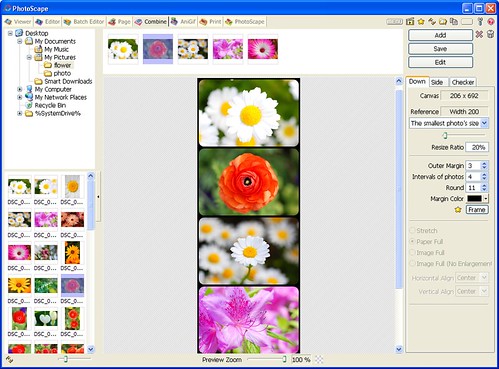
    Photoscape is a fun and easy photo editing software that enables you to fix and enhance photos.

    Key Features
    • Viewer: View photos in your folder, create a slideshow
    • Editor: resizing, brightness and color adjustment, white balance, backlight correction, frames, balloons, mosaic mode, adding text, drawing pictures, cropping, filters, red eye removal, blooming, clone stamp
    • Batch editor: Batch edit multiple photos
    • Page: Merge multiple photos on the page frame to create one final photo
    • Combine: Attach multiple photos vertically or horizontally to create one final photo
    • Animated GIF: Use multiple photos to create a final animated photo
    • Print: Print portrait shots, carte de visites(CDV), passport photos
    • Splitter: Slice a photo into several pieces
    • Screen Capture: Capture your screenshot and save it
    • Color Picker: Zoom in on images, search and pick a color
    • Rename: Change photo file names in batch mode
    • Raw Converter: Convert RAW to JPG
    • Paper Print: Print lined, graph, music and calendar paper
    • Face Search: Find similar faces on the Internet 

    Download Photoscape 3.5 link Mirror 1
    Download Photoscape 3.5 link Mirror 2
    Download Photoscape 3.5 link Mirror 3


      APP. STORE Copyright © 2010 App. Store is Designed by Wawan Home | RSS Feed | Comment RSS